May Product Update
May brings a video rebuild, richer Chat maps and citations, faster image search, password-protected ZIPs, and broader format support.
In May, the days are longer and the evidence queues are too. This month’s update is built for that moment: faster video review, steadier performance on large cases, and broader support for the messy file formats investigators actually see in the field.
Video, rebuilt
The big thing this month is that our support for Video now watches your videos, not just listens to them. That means you can get through piles of surveillance footage in hours instead of weekends. One investigator used it on bus footage and, within minutes of logging into Longeye, found the exact moment their person of interest boarded the bus.
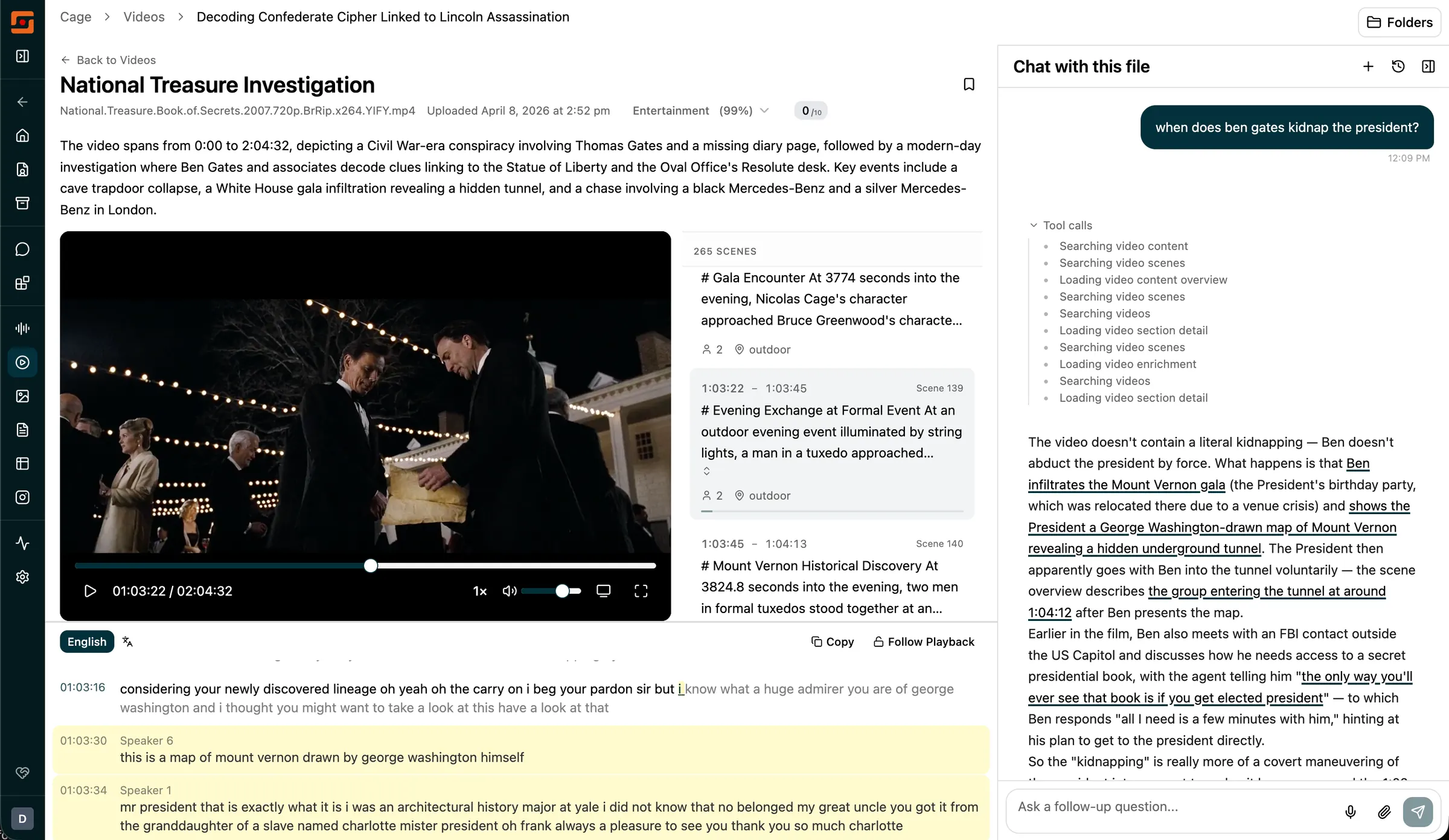
The video list is now a gallery grid, with thumbnails and auto-generated scene titles. Rather than a flat list of filenames, you see what’s actually in each clip. Theater mode provides full-screen playback with a karaoke-style synchronized transcript — so you can watch and read at the same time without switching between views.
Chat now analyzes video scene by scene, using a dedicated GPU pipeline we’ve been building for months. That means the heavy visual AI work runs on infrastructure built for this kind of footage review, so Longeye can search what is happening on screen instead of relying only on transcripts. Ask what’s happening at a specific point in the footage, and you get a cited summary with timestamps that jump directly to that moment. Every citation is clickable.
Picture-in-picture lets you keep a video playing while you work elsewhere in the case. The video and transcript panes are resizable. Playback speed goes up to 16x. Exotic formats — VOB, MKV, AVI, WMV, and Dahua’s .dav format from commercial security systems — now process automatically.
Chat
Chat can now extract IP addresses from any document, spreadsheet, or database and plot them on a map. Useful for login records, email headers, and connection logs.
Citation reliability got a significant upgrade. Chat now keeps tighter track of the source material behind its answers, making document, call-record, table, and video citations easier to inspect and less likely to point at the wrong evidence.
Chat also handles bigger investigative questions more gracefully. Warrant drafts, CDR cross-referencing, and broad document searches can now work through more sources and larger tool results before summarizing, instead of stopping early when a case has a lot of data.
The chat session history sidebar has a new layout: sessions organized into Shared with Team, Starred, and Recent, with small icons showing when a conversation produced a map, chart, or table.
New file and evidence types
A lot of new formats ship with this update:
- Viapath jail call records, with full metadata: caller name, PIN, recipient, facility, and call time
- ALEAPP exports (Android forensics tool widely used to parse phone logs), which were previously dropped silently at upload
- Instagram DM exports
- Google LERS search warrant returns, including email record sets
- Password-protected ZIP files, so locked evidence archives can be unlocked and processed without unpacking them locally
- PowerPoint (.pptx) and Word template (.dotx) files
- Dahua security camera footage (.dav)
- MPEG Transport Stream (.ts) video
Audio now gets an automatic type classification — interview, body cam, 911 call, and more — with a matching filter on the audio page.
AXIOM portable cases now show cleaner file paths, human-readable device names, and extraction metadata including BFU/AFU lock state, extraction scope, and chip family.
Under the hood
We also kept pushing on large-case performance. The images page now loads much faster on very large cases, including the complicated filter combinations investigators use to narrow hundreds of thousands of images without waiting on every count to recalculate.
Other fixes this month: random session logouts during long video reviews, folder filters returning zero results on large cases, CDR map timestamps now auto-detecting local timezone from GPS data, and upload flow now shows actionable error messages, including a warning when a partially-downloaded file is uploaded by mistake.