Product Update
June Product Update

Summer is here, and so are a few new things: relationship graphs, a dedicated Drafts page for your reports, and sharper CSAM detection.
Summer is here, and so are a few new things: relationship graphs, a dedicated Drafts page for your reports, and sharper CSAM detection.
Chat has a new trick: it can draw the relationship graph for you. Picture a case with a few hundred phone numbers and no obvious shape. Ask Chat who’s connected to whom, and instead of a wall of digits you get a picture: who’s talking to whom, and who sits at the center of it all. The phone that everyone routes through tends to be the one you want.
Here’s the part we’re proud of. As Longeye processes a case, it’s not just noting that two numbers talked. It’s gathering what it can about the people behind them. So the graph isn’t a bare web of dots. Click a node and you get a sense of who that person is and what the relationship actually is, not just that one exists. And every link is source-linked: click a connection and you land on the evidence that drew it, whether that’s the call, the PDF page, or the message. A graph won’t even draw a link it can’t point back to. Zoom controls keep dense networks readable.
You’ve been able to write reports in Longeye for a while. This month they got a front door. The new Drafts page gathers every report for a case in one place, so you’re not hunting for the one you started last week. Starting a new one is a click: open Drafts, hit Create report, give it a title, and you’re writing. You can pull in specific files right from the create dialog for Chat to draw on as you go.
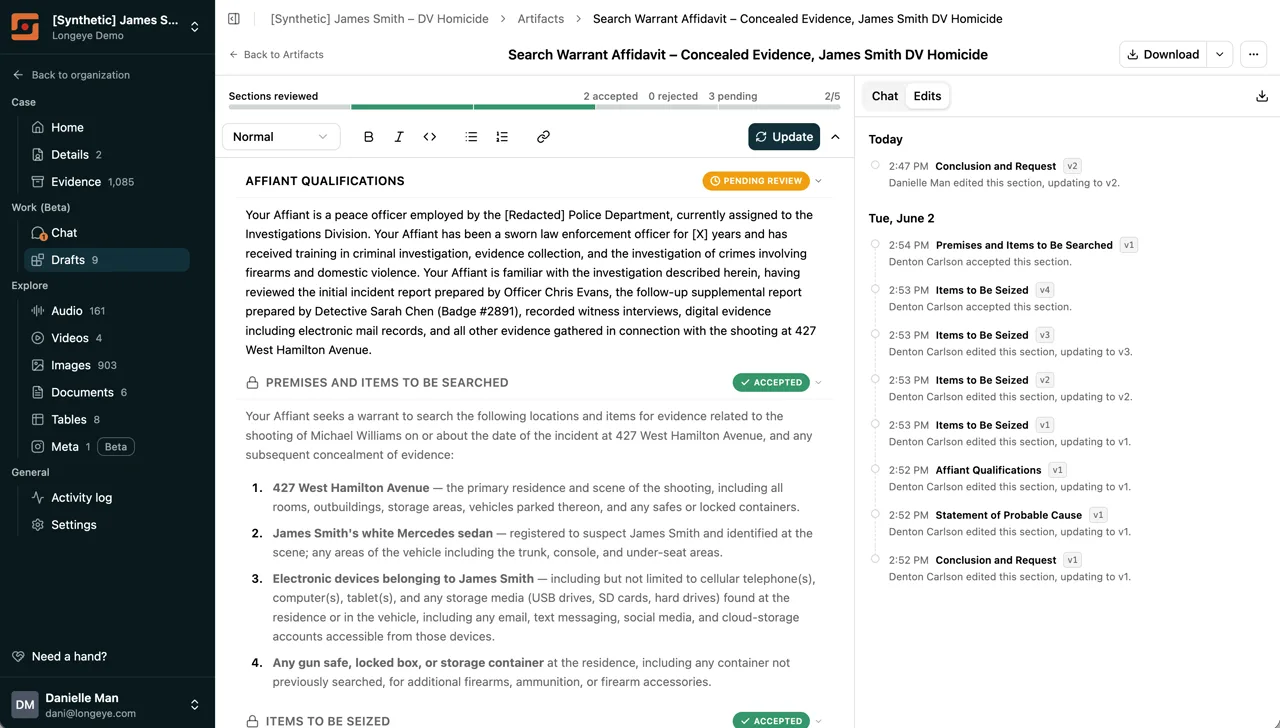
The bigger change is how a report gets finished. A report comes broken into sections, and each one is reviewed on its own: accept it, send it back, or leave it pending. The bar across the top tracks how far along you are: two accepted, three to go. Every edit is recorded with the section, the version, and who made it, so a partner can pick up where you left off and you can see exactly how each line got there. That trail isn’t just convenient. It’s what an AI-assisted report needs to hold up later.
Longeye has flagged suspected CSAM automatically during processing for a while now. This month we focused on two things: making the detection itself more precise, and making the human review faster and the reporting automatic.
Sharper detection. Early on, detection erred toward over-flagging, and the false positives added up. We narrowed the criteria and added a second-stage visual verification before anything gets flagged, so the flags you see now are far more likely to be real. This came directly from your feedback.
Review in place. Suspected CSAM appears behind a blurred, hazard-striped frame everywhere it could surface (gallery, lightbox, folder view), so it’s never shown clearly by accident. You confirm or dismiss a flag without leaving the image explorer, and the blur preference stays in sync across views.
Confirm once, propagate everywhere. When you confirm a flag, that file’s hash is recorded, and any other file matching it, across every case in your agency, is flagged automatically. You don’t re-review the same image twice.
Automatic NCMEC reporting. Confirming a file files a report to NCMEC’s CyberTipline on your behalf, with a full audit trail of who confirmed it and when. The mandated report goes out without a separate manual step.
Plenty more landed this month that doesn’t need its own headline. Chat got steadier across the board: fewer dead ends on tricky questions, citations that point where they should, and answers that hold up on long and unusual files. Search and playback got more reliable, and a good stack of smaller rough edges across audio, images, documents, and chat got sanded down.
A handful of quieter wins worth calling out: Chat carries recent results across turns, so follow-ups don’t re-run the same search; calls that switch languages mid-recording translate in full; image search reads meaning, not just exact words; and your filters now survive clicking into a result and back. Large audio cases got faster, too: UFDR archives with thousands of jail calls now spread across parallel workers, so a big extraction clears in a fraction of the time.
As always, find us at support@longeye.com if you have questions or feedback.